An automotive camera is an imaging device mounted on a vehicle, used mainly to capture images of the surrounding environment and support driving and safety. In conventional vehicles the term meant only the reversing camera, but as vehicles have become more intelligent and electrified, new functional requirements have emerged and applications have broadened, from the earliest dashcams to today's lane change assistance, parking assistance, intelligent driving and in-cabin monitoring.

NTEK optical laboratory
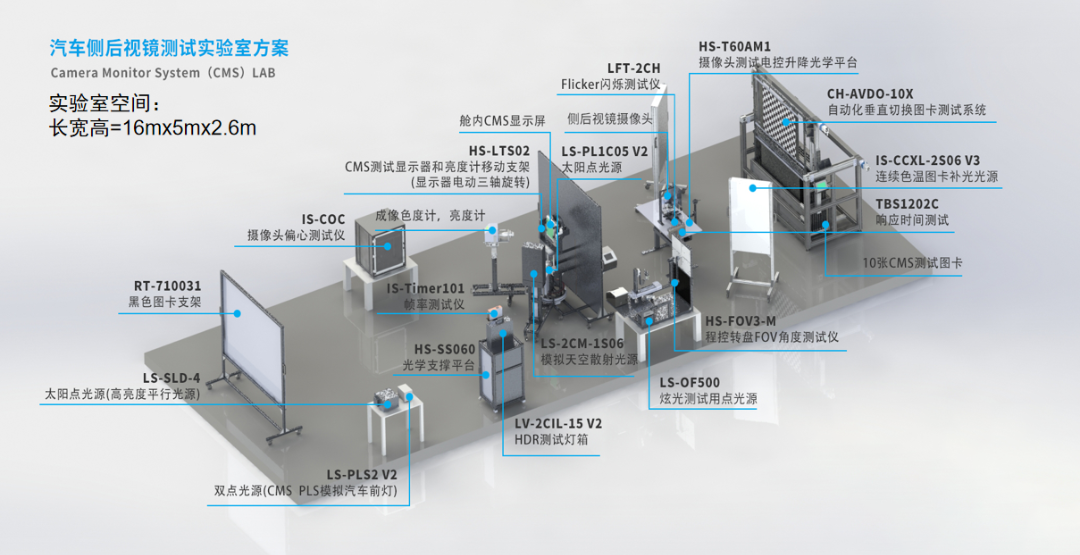
With the rapid development of autonomous driving technology, automotive cameras have become a key part of the perception system, capturing images and video of the surrounding environment. This data is processed by the autonomous driving system to recognise and detect road signs, lane markings, pedestrians and vehicles, providing the information the decision system needs. Because of this importance, testing reliability and optical performance has become essential to safeguarding product quality. NTEK Group has introduced a complete set of test capabilities for automotive cameras and exterior mirrors and has built an optical laboratory to the requirements of the standards, protecting driving safety.
The layout of the optical laboratory is shown below.
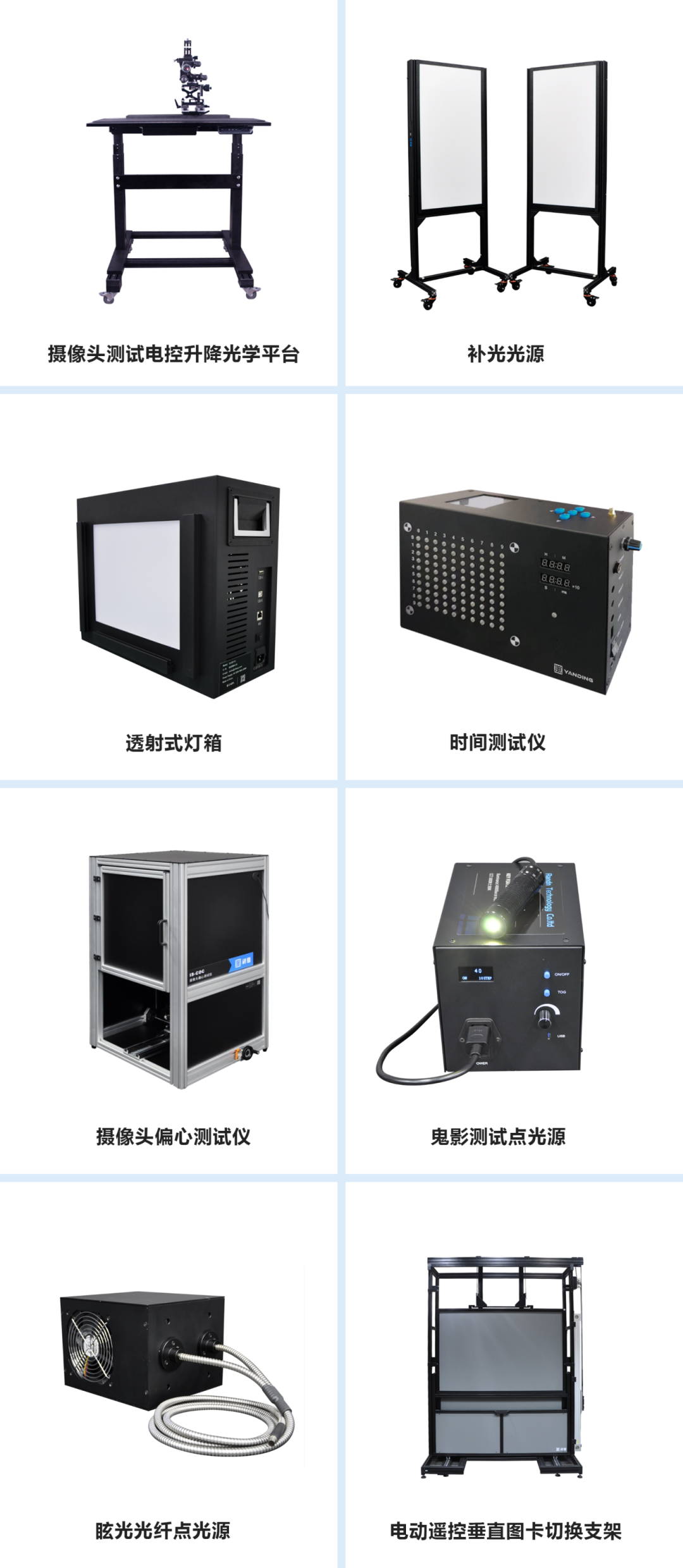
Typical test equipment is shown below.
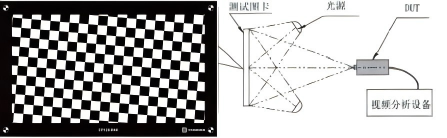
MTF test method
For HFOV of 140° or more, use a slanted checkerboard test chart and adjust the distance between the DUT and the chart so that the edge of a square in the chart is at least 10 pixels long. Then:
b) Adjust the DUT so that the angle between the square edge in the centre field and its corresponding direction is about 5°.
c) Adjust the DUT so that its optical axis is perpendicular to the chart plane, and use image processing software to analyse the MTF50P value in the centre field.
d) Rotate the DUT horizontally or vertically so that the chart square under test is at the 70% field position, with the square edge at least 10 pixels long.
e) Use image processing software to analyse the MTF50P values at the 70% field, that is the four corners: upper left, upper right, lower left and lower right.
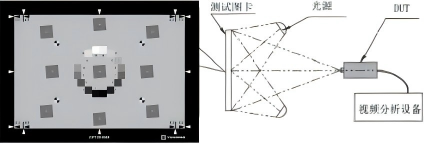
For HFOV of less than 140°, use a slanted edge test chart, adjust the DUT so that the angle between the chart edge in the field of view and its corresponding direction is about 5°, and use image processing software to analyse the MTF50P values in the centre field and at the 70% field, that is the four corners.
As required by QC/T 1128, the horizontal or vertical MTF value of the product shall meet the requirements in the table below.

White balance
Before explaining white balance, one concept must come first: colour temperature, also called correlated colour temperature (CCT), a way of measuring temperature used in physics and astronomy. The concept is based on an imaginary absolute black body. As an absolute black body is heated from absolute zero (-273℃), its colour changes gradually from black to red, then yellow, then white, and finally blue. This change of colour with temperature is its spectral characteristic. At a given temperature, the spectral composition of the light emitted by the black body becomes the colour temperature for that temperature, expressed in kelvin (K).
For example, if the light from a source has the same spectral composition as light from a black body at a certain temperature, it is said to have that colour temperature. If a 100 W bulb emits light of the same colour as an absolute black body at 2,527℃, the colour temperature of the bulb is (2,527 + 273) K = 2,800 K. Colour temperature defined this way is the opposite of the everyday sense of warm and cool: people usually feel that red, orange and yellow are warm and white and blue cool, but in fact red has the lowest colour temperature, followed by orange, yellow, white and blue, with blue the highest.
Colour temperature affects not only visual perception but also mood and physiological response. High colour temperature light improves attention, boosts alertness, improves visual experience and helps regulate the body clock; medium colour temperature light calms the mood, adds warmth and improves visual comfort; low colour temperature light creates a romantic atmosphere, encourages relaxation and increases comfort. Choosing the right colour temperature for each setting and need is important in both life and work.
White balance (WB) means that the image a camera records of a subject under different lighting conditions should reproduce colour in a way that matches what the human eye sees under the same lighting. As shown below, white appears to the eye as white.

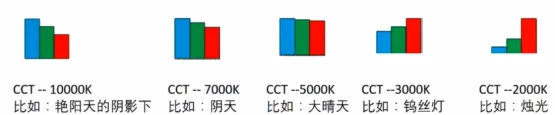
This is why photos taken in natural light differ in colour with the time of day, since the colour temperature of the light differs. Shooting under a clear blue sky gives a cooler cast because the light has a higher colour temperature, whereas shooting at dusk gives a warmer cast because the light has a lower colour temperature. Shooting with artificial light produces the same effect, with different light sources giving different colour casts.
So how is the colour deviation handled? This is where white balance comes in. Under the Chinese automotive industry standard QC/T 1128, Automotive Cameras, white balance is the technique by which the in-vehicle display adjusts the ratio of the red, green and blue primaries under different lighting environments to ensure that white is displayed accurately without colour deviation. Its core purpose is to ensure that the display renders true and consistent colour in all ambient light, such as daylight, overcast and night, restoring the normal colour of the image and avoiding misinterpretation or visual fatigue caused by differences in colour temperature.
In the figure below, the left image has an obvious overall white balance error and many patches are clearly off-colour, a colour response that would be unacceptable for consumer electronics imaging.
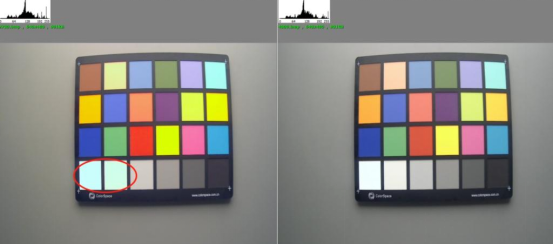
The white balance algorithm in a camera module adjusts the intensity of the RGB channels to compensate for the colour temperature of different light sources - warm light tending yellow, cool light tending blue - so that white appears neutral on the display. Alternatively an ambient light sensor detects external lighting conditions in real time and adjusts white balance parameters automatically to ensure colour consistency.
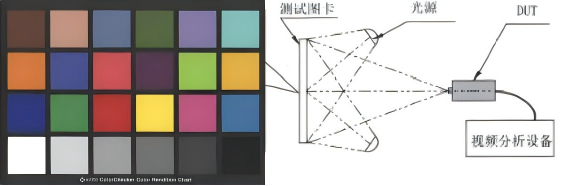
White balance is tested by illuminating a Macbeth 24-patch colour chart with light sources at different colour temperatures, 800 lx at 2,800 K, 4,000 K and 6,500 K. The neutral patches on the chart must show no obvious colour difference and the image must not be colour cast. For patches 21 and 22, the two grey patches in the middle of the 24-patch chart, the saturation (S) value in HSV shall be less than 15%.
Finally, a note on the HSV parameters and their values for a grey card.
HSV (hue, saturation, value) is a colour space built from the human visual system and widely used in image processing and computer vision. Hue H indicates the type of colour, such as red or green. Hue is the primary attribute of colour and the most precise criterion for distinguishing colours; in fact every colour other than black, white and grey has a hue. Nature offers an infinite variety of hues such as magenta, silver grey and orange yellow. Hue is the name of the appearance of a colour, the main ones being the three primaries red, yellow and blue and the three secondaries orange, green and purple. The hue wheel is a very useful model of colour theory, arranging colours in order around a circle so that relationships between colours are easier to understand and apply.
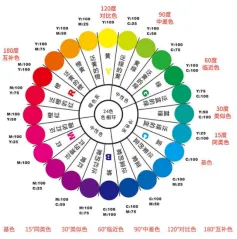
Saturation S indicates the purity of a colour, that is how vivid it is, also called chroma, and represents the proportion of grey mixed into the colour. In colour theory the higher the saturation, the more vivid the colour, with primaries the most saturated; as saturation falls the colour becomes duller until it becomes achromatic, black, white or grey, losing its hue.
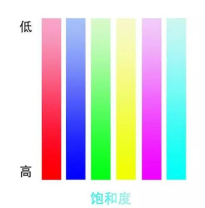
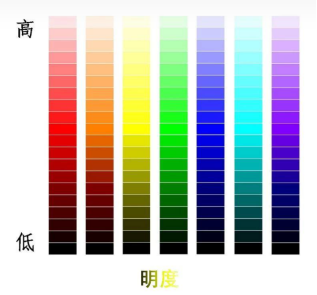
Value V indicates the brightness of a colour, reflecting how strongly light is reflected or emitted and determined by light intensity. The higher the value, the closer the colour is to white, and the lower the value, the closer to black. The same hue can range from deep to pale by adjusting brightness, as from dark red to pink.
A grey card is a tool for calibrating displays or printers, characterised by tones that are all grey with no colour component. In HSV space a grey card therefore has hue H of 0 or any value, since grey is unrelated to hue, saturation S of 0, and value V varying between 0 and 1 to represent different grey tones.
Specifically: hue H is 0 or any value because grey is unrelated to hue; saturation S is 0, meaning the colour contains no colour component and only varies in grey level; and value V varies between 0 and 1, representing different grey tones. A grey card is therefore expressed in HSV space as H = 0, S = 0, with V varying from 0 to 1.
Signal to noise ratio (SNR) test
Signal to noise ratio is the ratio of the video signal to the noise, meaning unwanted signal, expressed in dB:
SNR (dB) = 20 log10 (Si / Ni)
where Si is the signal of patch i, its mean pixel luminance value, and Ni is the noise of patch i, the standard deviation of pixel luminance values.
In video signals SNR is one of the key indicators of quality. The higher the SNR, the clearer the video signal, the less noise interference and the better the video quality. Conversely, a lower SNR means more noise in the signal, which can affect the viewing experience.
Noise in an image is content that the original scene did not carry, often described in imaging as artefacts. Noise usually comes from statistical deviation in measurement caused by random processes. In imaging it appears as blemishes that look like grain overlaid on the image, and within one image noise takes different forms and degrades quality.
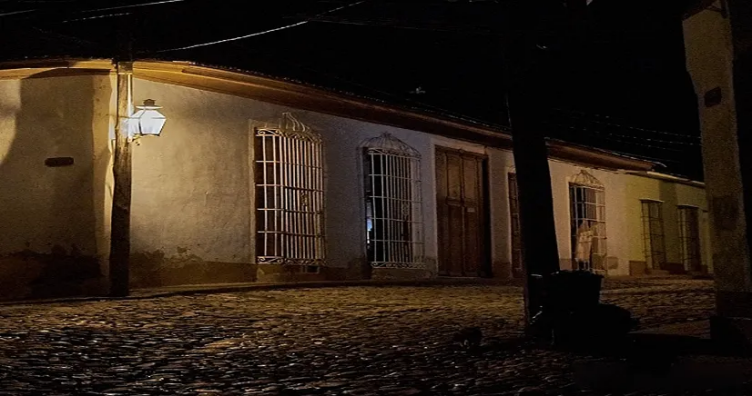
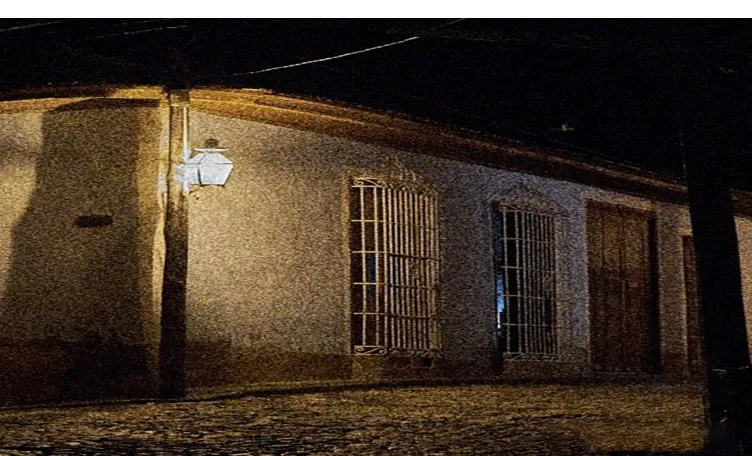
The two comparison images above show the effect of noise on image quality
Noise is a by-product of the irregular signal disturbance that accompanies transmission, blurring the target of interest. In imaging the ideal is therefore a strong signal with minimal accompanying noise, but this is hard to achieve in practice, especially in low light where the signal itself is already weak.
The SNR test method is as follows.
a) Using a D50 surface light source, adjust the brightness as specified in ISO 15739:2013 clause 5.4.3, so that the digitised luminance value of the 18% grey patch area on the OECF chart is 110 to 130, with 118 recommended. Backlight luminance uniformity shall be at least 90% and the amplitude variation of luminance shall not exceed 2%.
b) For DUTs with HFOV below 140°, select at least 64 by 64 pixels at the centre of each grey patch; for DUTs with HFOV of 140° or more, select at least 45 by 45 pixels.
c) Using image processing software, analyse according to Annex B of ISO 15739:2013 and take the overall mean SNR of all patches as the evaluation value.
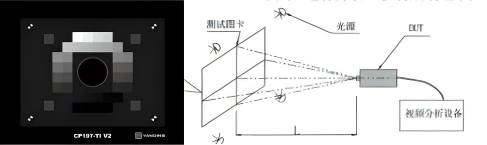
QC/T 1128 requires SNR of at least 34.7 dB for SD products and at least 30 dB for HD products.
Finally, an explanation of what 18% grey means. We see objects because light falls on them and the reflected light enters our eyes to form an image. Different objects reflect light differently: a pure white object reflects 98% of light and a pure black object reflects 0%. One might think that an object that is neither pure black nor pure white reflects 50%, but that is not the case. Long ago scientists established that the average reflectance of objects in nature is 18%, which is the brightness the human eye normally sees. This 18% is called the mid tone, or 18% grey.
We can judge brightness with our eyes and tell whether a scene is too bright or too dark, but a camera cannot: it is a machine and cannot judge. We therefore give the camera a standard, telling it that exposure within that standard is normal, that below it the image is dark and above it the image is bright.
Since the average reflectance of objects in nature is 18%, which is the brightness we see, 18% grey is used as the camera standard: images taken within the standard are correctly exposed, below it underexposed and above it overexposed.
When shooting, the camera meters the brightness of the scene and adjusts aperture, shutter speed and sensitivity to produce an 18% grey image, neither bright nor dark but correctly exposed. Try photographing a pure white object such as white paper, or a pure black object such as black paper: whether white or black, the resulting photo comes out grey. This is because when shooting a pure white object the camera thinks the image is overexposed and reduces exposure, so the photo is grey; shooting black paper, the camera thinks the image is underexposed and increases exposure, so the photo is again grey. It comes out grey because of the 18% grey standard, which the camera treats as correct exposure.
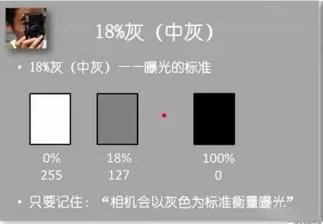
Photographing pure white and pure black objects:
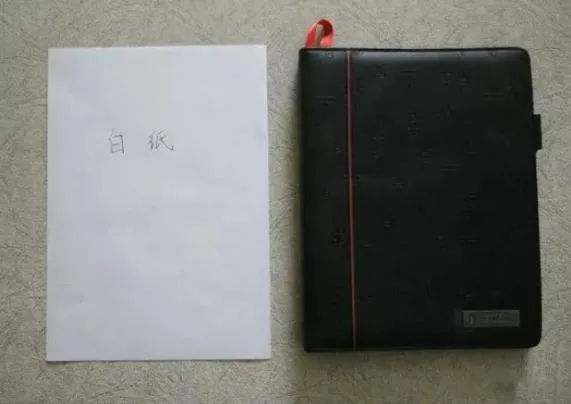
White paper comes out grey

Black paper also comes out grey

For most subjects the 18% grey standard works and the image is correctly exposed, but extreme conditions are different. Shooting a snow scene, where everything is white, gives a dull grey result without exposure compensation; the same applies to low key portraits where the frame is nearly all black. So when shooting snow a little extra exposure is needed to render the snow white:
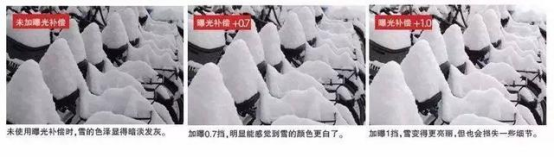
And when shooting low key images, exposure must be reduced to render true blacks:

This is the familiar rule of adding exposure for bright scenes and reducing it for dark ones.
Dynamic range
Dynamic range (DR) is the maximum tonal range a camera can record, from the darkest to the brightest. The wider the dynamic range, the more clearly the image separates tones. Any exposure value outside the dynamic range can only be recorded as black or white. Dynamic range describes the ability of the camera to record grey levels and can be expressed as the number of grey steps on a greyscale test chart.
The dynamic range of natural scenes, from a moonless night to direct sunlight, is about 180 dB, whereas a conventional image sensor is limited by well capacity to about 70 dB.
Within a single scene the real world dynamic range varies widely, which is called high dynamic range, while the dynamic range of an ordinary photograph is low dynamic range. Camera imaging is in effect a non-linear mapping from the high dynamic range of the real world to the low dynamic range of the photograph.
As shown below, from left to right the images show low dynamic range, the original and high dynamic range. It is clear that:
(1) The wider the dynamic range, the clearer the detail in highlights and shadows and the more balanced the histogram.
(2) The narrower the dynamic range, the more likely highlights blow out and shadows crush, with detail in both nearly lost and histogram pixels piling up at both ends.
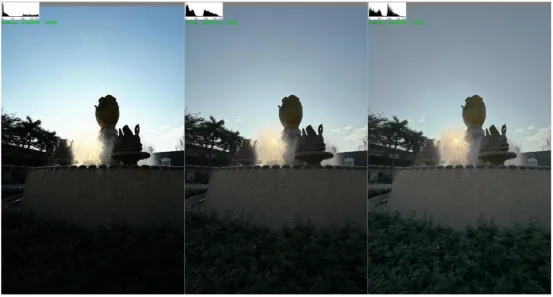
The dynamic range test method is as follows.
1) Using a D50 surface light source, adjust the brightness as specified in ISO 15739:2013 clause 5.4.3, so that the digitised luminance value of the 18% grey patch area on the OECF chart is 110 to 130, with 118 recommended. Backlight luminance uniformity shall be at least 90% and the amplitude variation of luminance shall not exceed 2%.
2) Select at least 32 by 32 pixels at the centre of each grey patch.
3) Calculate the dynamic range value with the formula below.
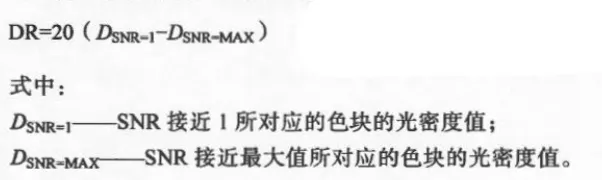
QC/T 1128 requires dynamic range of at least 60 dB for SD products and at least 85 dB for HD products.

Dynamic range test setup
Colour rendition
Colour rendition is the mapping of image data describing the colour space coordinates of a scene into image data describing the colour space coordinates of the photograph at the output. Colour rendition usually involves compensation for differences between input and output viewing conditions, so the scale and gamut describing the scene colour must be mapped onto the dynamic range and gamut of the photograph, with preference adjustments applied. In simple terms it is the ability of an imaging device to reproduce the colours of a subject faithfully, and it is an important factor in image quality.
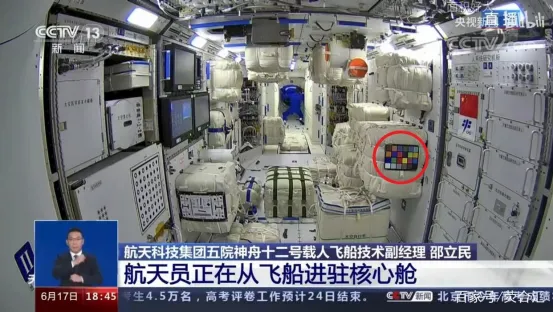
In CCTV live broadcasts a standard 24-patch colour chart is visible, as circled in red below. The chart is used to correct the colour of the cameras in the core module in real time. Radiation in space changes constantly and cannot be controlled, so the colours captured are usually distorted, and a standard chart is needed to correct the image back to true colour.
Without colour correction the live image would look like the upper part of the figure below: the whole frame is clearly blue with very little colour separation, as if inside a giant cold store, and the colour is clearly distorted. With correction by the colour chart, as in the lower part, the colours have far more depth: the equipment is white, the packages are yellow and the astronaut's suit is blue, rather than everything appearing blue. This is the effect of the colour chart, and the process of correcting a camera is what we call colour rendition.
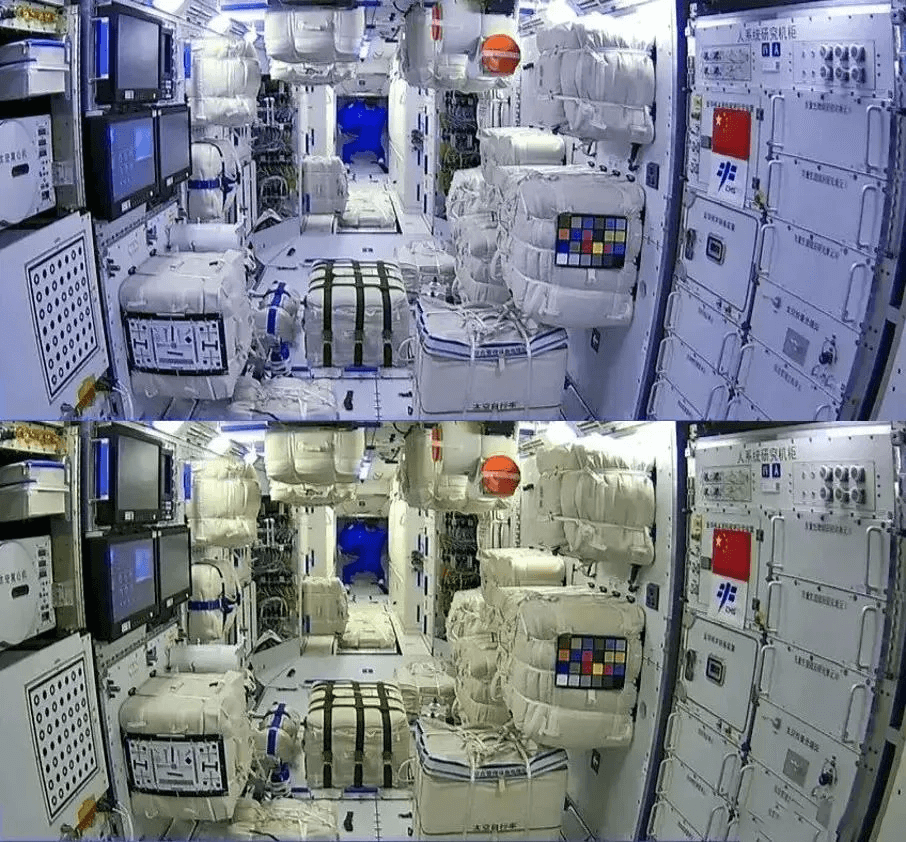
The Shenzhou-12 example shows that images corrected with the 24-patch chart have more faithful colour and more depth. In other words, colour separation after correction is higher, and colour rendition is an important indicator of image quality.
Colour rendition testing shall be carried out after automatic white balance is complete, under D65, TL84 and illuminant A lighting, with chart surface illuminance of (800 ± 80) lx, (200 ± 20) lx and (25 ± 2.5) lx respectively.
Adjust the framing of the DUT so that the edge of the test chart coincides with the edge of the field of view.
Use video analysis equipment to analyse the chromaticity coordinates of each patch captured by the DUT.
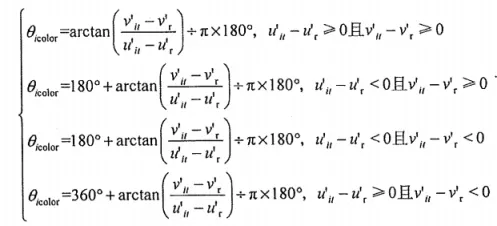
Calculate the hue angle between each colour patch (i = R, G, B, Ye) and the white patch as follows.
Then calculate the Euclidean distance between each colour patch (i = R, G, B, Ye) and the white patch using the formula below.
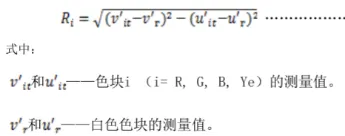
QC/T 1128 requires, based on hue angle in the CIE 1976 chromaticity space, that the Euclidean distance of the measured chromaticity error between each colour patch and the white patch shall be at least 0.02, and the hue angle shall meet the following requirements:
a) The red patch coordinate shall lie within (0°, 44.8°) or (332.2°, 360°).
b) The green patch coordinate shall lie within (96.6°, 179.9°).
c) The blue patch coordinate shall lie within (209.9°, 302.2°).
d) The yellow patch coordinate shall lie within (44.8°, 96.6°).
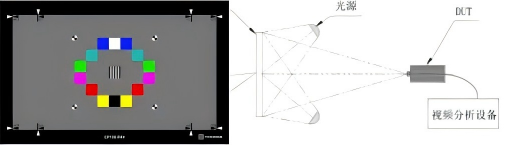
Colour rendition test setup
A final note on colour spaces. The CIE 1931 XYZ colour space, also called CIE 1931, is one of the first colour spaces defined mathematically. It was created by the International Commission on Illumination (CIE) in 1931 as a system of colour specification and colour mixing based on psychophysical colour, that is on the psychological perception of colour. It is the most scientific and precise way of measuring and expressing colour numerically in colorimetry, and it gave the world a unified method of colour measurement. The human eye has receptors, the cones, for short (S, 420 to 440 nm), medium (M, 530 to 540 nm) and long (L, 560 to 580 nm) wavelengths, so the ratio of stimulation of the three cone types can describe the sensation of any colour, which is called the LMS space. A colour space describes the sensation of colour in an objective way and usually needs tristimulus values. More precisely, three primary colours are defined and a colour mixing model is used to describe any colour. The CIE 1931 colour space usually gives tristimulus values expressed as X, Y and Z. Note that the primaries need not be real colours that can actually be produced: X corresponds to a red-purple more saturated than spectral red, Y to a green more saturated than spectral green at 520 nm, and Z to a blue more saturated than spectral blue at 477 nm. In an additive model, if a colour and a mixture of different amounts of the three primaries look the same to a human observer, the amounts of the primaries are the tristimulus values of that colour. The three standard monochromatic lights can be measured precisely by photometric methods.
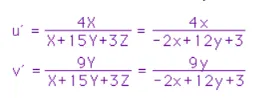
The CIE 1976 chromaticity space, full name CIE 1976 (L*, u*, v*) and also known as CIELUV, was created to improve on the earlier CIE 1931 XYZ chromaticity diagram so that it is visually more uniform, meaning that differences between colours better match human perception. L* represents brightness, while u* and v* are chromaticity coordinates describing colour; together the three-dimensional coordinates form a colour solid. For ordinary images u* and v* range from -100 to +100 and brightness from 0 to 100. The U' and V' values can be calculated from the tristimulus values X, Y and Z by the formulas below.
Hue angle indicates the direction of a colour's hue, calculated from the relative position of the u' and v' coordinates to the white point. Chromaticity distance ΔC is the straight-line distance between two colours in the chromaticity diagram, used to quantify chromaticity difference. In the CIE 1976 UCS it is calculated directly as the Euclidean distance between u' and v' coordinates, as follows.

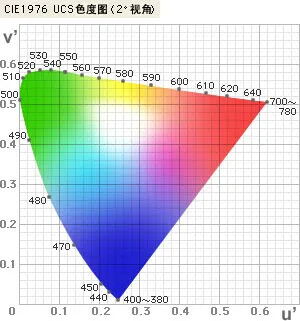
CIE 1976 UCS chromaticity space
Glare
Glare is a visual condition in which an unsuitable luminance distribution in the field of view, with extreme luminance contrast in space or time, causes visual discomfort and reduces the visibility of objects. It appears as an unsuitable luminance distribution with extreme spatial contrast that impairs vision or reduces visibility. If a local area in the camera field of view is excessively bright, the camera cannot cope with that intensity; if the glare area fills the whole field, overall image contrast may drop. A backlit shot, for example, where strong light enters the lens directly, produces excessive brightness around the source, a halo and a veiling effect.
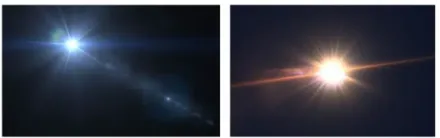
Glare
For testing, a glare point source is directed through a mirror into the field of view of the DUT, and the incidence angle is adjusted so that the light spot in the image is as large as possible. Video analysis equipment then calculates the area where signal intensity exceeds 50% of the maximum in the image, and the ratio of that area to the whole image.
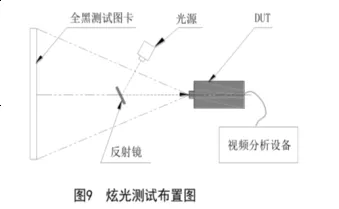
Acceptance requirement: the spot area produced by the lens under the test light shall not exceed 25% of the display area.
Ghost image
A ghost is an additional image formed when a high luminance source in the environment reflects rapidly between the lens elements and finally reaches the image. It is generally dimmer than the original image and offset from it. Because this can happen at any pair of lens surfaces - in fact it always happens, only with different intensity - many optical paths are possible and a string of spots often appears.
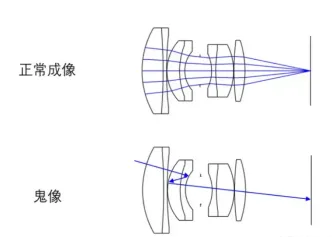
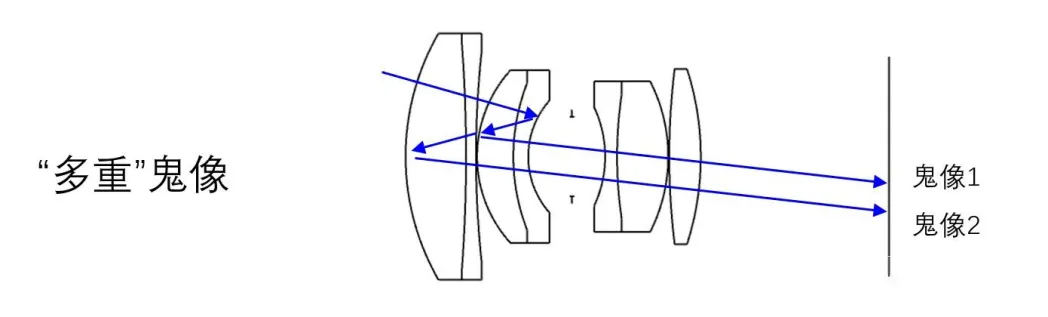
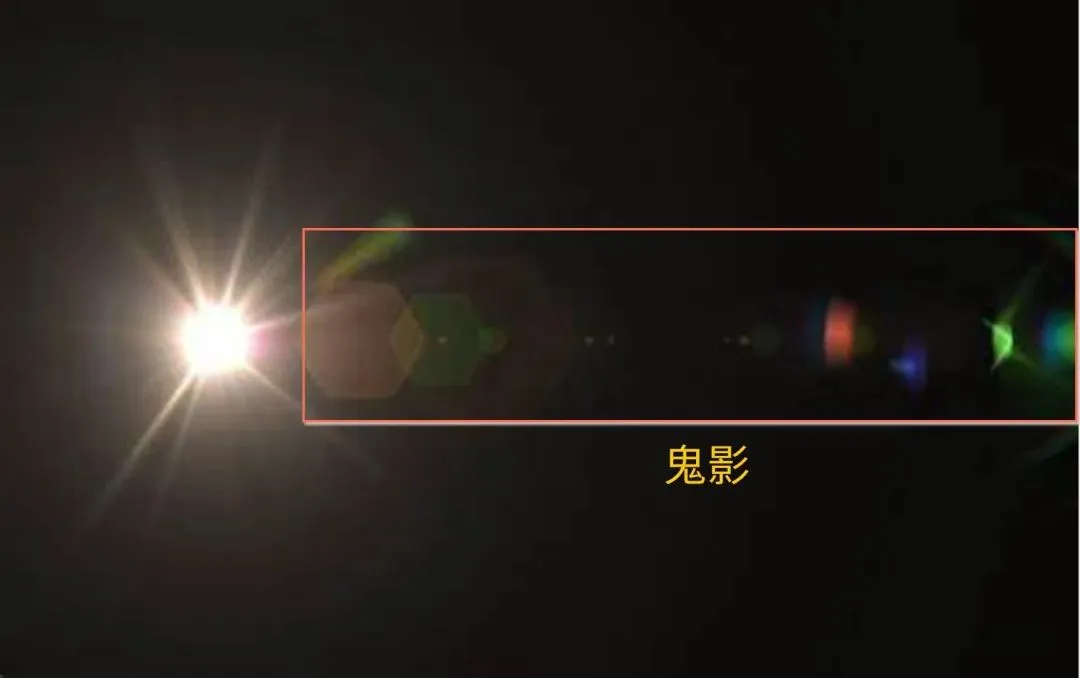
The area ratio of ghost to field of view shall meet the following requirements:
a) If the peak luminance ratio of the ghost to the original image is greater than 50%, the area ratio of the ghost to the field of view shall be less than 1%.
b) If the peak luminance ratio is greater than 30% and not more than 50%, the area ratio shall not exceed 8%.
c) If the peak luminance ratio is not more than 30%, there is no requirement on the area ratio.
For testing, the DUT is rotated horizontally clockwise and then anticlockwise about the geometric centre of the lens, images of each field of view are saved, and the ghost area ratio and luminance ratio are then calculated for each image, which makes the test fairly laborious.
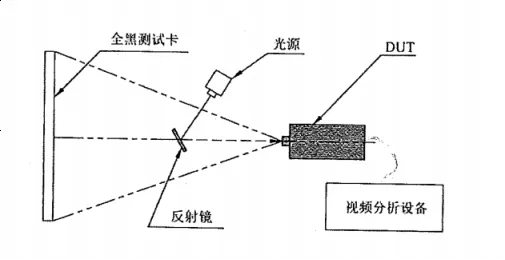
Ghost test equipment setup
System latency
System latency, also called delay time, is the interval from the camera capturing an image to the terminal displaying it, reflecting how quickly the camera system responds to changes in the scene. The shorter the better. If an autonomous vehicle experienced a long delay in perceiving and processing road conditions, driving safety would be seriously threatened. The test mainly ensures that the camera system reflects conditions behind the vehicle in good time during driving, improving safety.
In the figure below, the time difference between signal 1 and signal 2 (the DUT) is the system latency, tSL, and the measured value shall not exceed 100 ms.
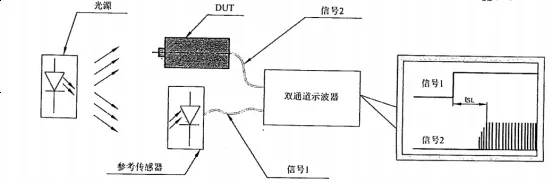
System latency test setup
Start-up time
Start-up time is the time from the camera starting up to being able to work normally. Fast start-up significantly improves efficiency. In applications requiring real-time monitoring or rapid response, such as traffic monitoring and access control, fast start-up reduces waiting time and ensures the system captures key events in time, improving overall safety and efficiency. Fast start-up matters especially for battery powered wireless cameras, which usually run on lithium or dry cells and need frequent charging or replacement. Technologies such as SmartAEC, covering automatic exposure control, automatic gain control and automatic white balance, allow a camera to start up and adjust within milliseconds, cutting energy use and extending battery life, which is a great advantage for long monitoring or unattended scenarios such as industrial lines and warehouse logistics.
Fast start-up also has environmental benefits. Low power design means the camera consumes less electricity, reducing energy use and carbon emissions in line with environmental requirements, which matters for environmental protection and sustainable development.
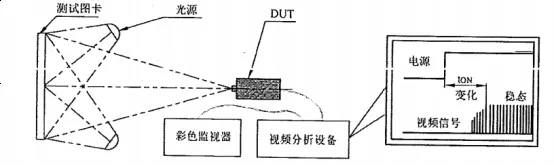
In the figure below, the time difference between the DUT supply voltage signal and the steady video output signal is the start-up time, tON, and the measured value shall not exceed 1 s.
Start-up time test setup
Frame rate
Frame rate is the number of complete images produced per unit time, that is the number of full scans of the spatial lines of the video signal per unit time. It measures how many frames are displayed per second and directly affects the smoothness of video and games. A high frame rate gives a smoother experience, while a low frame rate can cause stutter.
Persistence of vision means that when the eye observes a scene, the visual image does not disappear immediately after the light signal reaches the brain but lingers for about 0.1 to 0.4 s. Cinema exploits this by showing 24 still frames per second, which the viewer perceives as continuous motion.
The QC/T 1128 requirements for frame rate are shown in the table below.

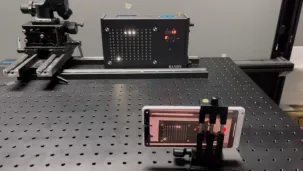
Frame rate is measured with a timing tester, and the test setup is shown below.
Effective pixels
A pixel, short for picture element, is the smallest basic unit of a digital image or display. In simple terms it is a tiny square carrying colour and brightness information, and countless such squares arranged in rows and columns make up the complete image or screen we see.
Effective pixels are those in an electronic image sensor that perform effective photoelectric conversion and output an image signal. Effective pixel count is a core indicator of image quality: more effective pixels mean larger images and more detail. Effective pixels differ from the pixel count in that the pixel count is the total number of physical units that can sense light individually, but some are used for auxiliary calculation, to compensate manufacturing error or edge distortion, or cannot sense light effectively because of technical limits, so the effective pixel count is lower than the pixel count.
The QC/T 1128 requirement for effective pixels is shown in the table below: the image signal shall be normal with no loss of signal.

Testing effective pixels is straightforward: take an image with the DUT and analyse it directly with image analysis software.
Field of view
Field of view is the angle, with the lens centre of the camera as apex, formed by the two edges of the maximum range over which the subject image can pass through the lens. The size of the field of view determines the visual range of the optical instrument. Generally, the shorter the focal length, the wider the field of view, and the larger the sensor, the wider the field of view. Field of view is divided into horizontal field of view (HFOV) and vertical field of view (VFOV). A wide field suits scenarios needing a broad view, while a narrow field suits high magnification and fine observation.
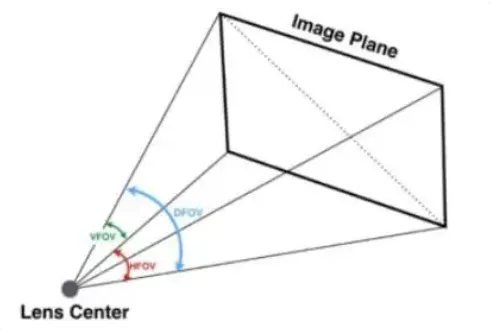
Definition of field of view
QC/T 1128 recommends HFOV of 30° to 200° and VFOV of 20° to 160°.
Test method: fix the DUT horizontally at the centre of a dividing table with the lens face 500 mm from the test chart and the lens centre aligned with the table centre. Rotate the table so that the vertical line of the test chart appears at the far left of the monitor, and read the rotation angle ∠a. Rotate the table the other way so that the vertical line appears at the far right, and read the rotation angle ∠b. The difference between ∠b and ∠a is the HFOV. Fix the DUT rotated by 90° at the centre of the table and measure the VFOV in the same way.

Field of view test setup
Maximum illuminance test
The maximum illuminance test evaluates camera imaging performance under extreme bright light, ensuring that detail is still captured clearly in high brightness scenes without overexposure, flare or colour distortion.
Test method: ensure that the illuminance on the surface of the subject is at least 100,000 lx, using a transmission light box as the subject, capture it with the camera and make a subjective judgement. The image shall be normal with no rolling, tearing, moiré, colour cast or washing out.
Minimum illuminance test
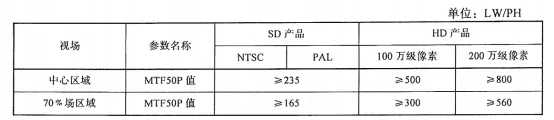
Minimum illuminance, also called sensitivity, is how sensitive the camera is to ambient light, or how dark the scene can be for the camera to image normally. Illuminance is measured in lux (lx), and the smaller the value, the less light is needed and the more sensitive the camera. This test is carried out in a dark box or dark room, with the DUT at an illuminance of (2 ± 0.2) lx, following the MTF test method and analysing the MTF values in the centre field and at the 70% field with image processing software. The MTF values shall be at least 60% of the values in the table below, with no interference fringes or moiré.
Optical axis centre accuracy
Optical axis centre accuracy is the deviation between the actual imaging centre of the camera and the theoretical centre of the optical image. This parameter directly affects imaging quality and alignment accuracy and is especially important in precision optical systems.
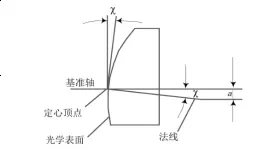
Definition of optical axis centre accuracy
Optical axis centre accuracy is measured with a camera decentration tester, measuring the offset between the image position of the test chart centre and the physical centre of the DUT image, then calculating the optical axis deviation angle. QC/T 1128 requires a measured value within (0 ± 2)°.
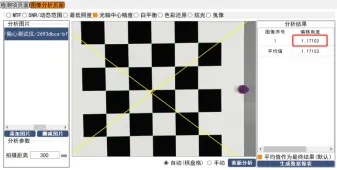
θ = arctan(Δɑ / f) in radians, and θdeg = θ × 180 / π in degrees
Automatic gain control
Automatic gain control is a method of automatically adjusting the gain of an amplifier according to signal strength. It adjusts the gain of the video amplifier according to ambient lighting so that a clear image is obtained under different lighting conditions. Gain is the degree to which the signal captured by the sensor is amplified: increasing gain makes the image brighter but also increases noise and lowers the signal to noise ratio. An AGC circuit adjusts amplifier gain automatically as ambient light changes. In low light AGC increases gain to obtain a clear image, while in bright conditions it reduces gain to avoid signal overload and distortion. This automatic adjustment lets the camera work over a wide illuminance range and adapt to different ambient lighting.
Test method: set up the DUT so that it outputs a standard video signal. Within less than 1 s, switch a D65 light source at (800 ± 80) lx to (2 ± 0.2) lx, then start timing and use video analysis equipment to measure the time for the video signal to change and stabilise. After an interval of 5 s, within less than 1 s switch back to the D65 light source at (800 ± 80) lx, start timing and measure the time for the video signal to change and stabilise. QC/T 1128 requires the response time after switching light sources to be no more than 1 s.
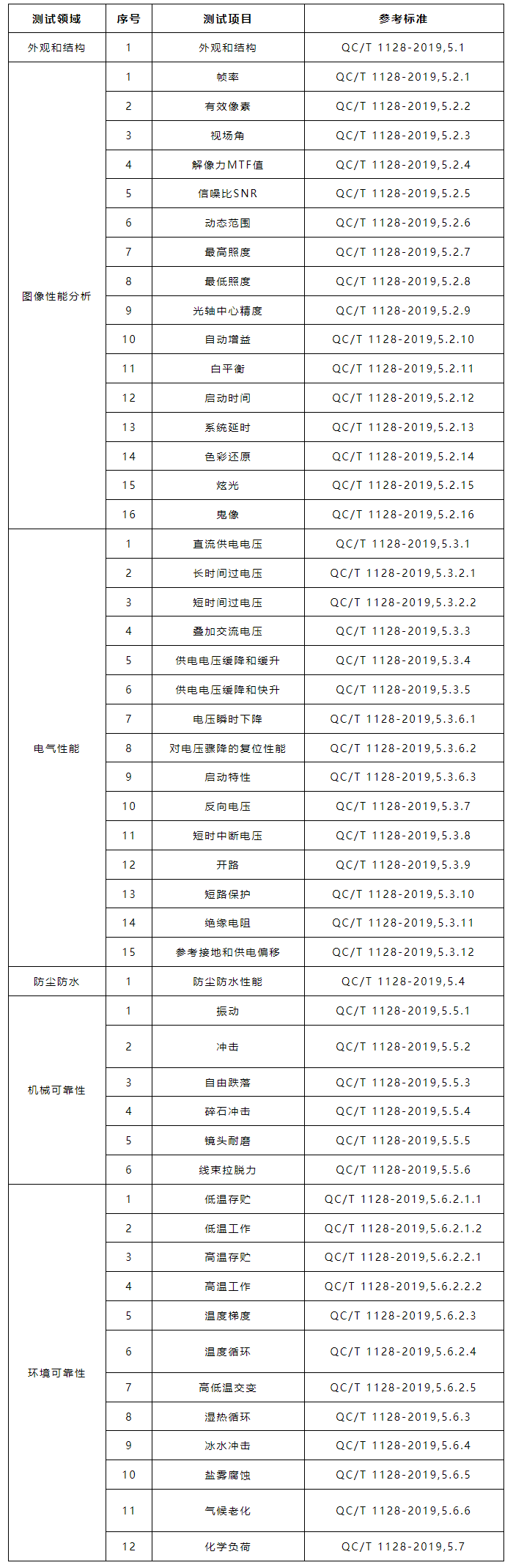
QC/T 1128 test items








 WeChat Official Account
 Submit successfully